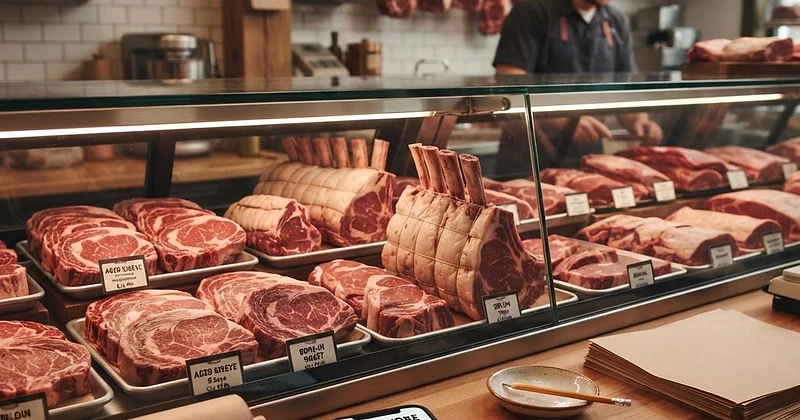
Master your butcher visits and bulk meat runs with Natural Carnivore's auto-generated, category-organized grocery lists. Shop faster, save money, and never forget a cut.
We only share products we believe in. Buying through a link may earn us a small commission — thanks for the support. Learn more →
Stepping into a local butcher shop or wholesale club can feel overwhelming when you are eating an animal-based diet. When meat is your primary fuel, walking in without an organized plan often leads to decision fatigue, overspending, or worse—leaving behind essential cuts you needed for your weekly dinners. That is where a smart, structured carnivore shopping list makes all the difference.
Natural Carnivore takes the guesswork out of butcher visits by automatically turning your scheduled meals into an itemized, category-organized checklist. Here is your practical walkthrough on how to leverage the platform to turn chaotic meat runs into efficient, stress-free errands.
The Secret to Effortless Meat Shopping: Automated Categorization
Whether you follow the Lion path, traditional Carnivore, or Ketovore, your shopping needs are unique. Standard generic shopping apps group items around produce aisles and processed snacks, which does not help when you need precise weights of chuck roasts, organ meats, tallow, and ribeyes.
Natural Carnivore’s built-in grocery lists solve this by syncing directly with your planned menu. Items are categorized naturally—separating beef, poultry, pork, seafood, fats, and dairy—so you can navigate meat counters and wholesale cold rooms quickly without doubling back across the store.
Step 1: Set Up Your Profile and Diet Path
Your shopping list starts with your nutritional foundation. If you haven’t already completed your setup, head to Onboarding to select your lifestyle path:
- Lion: Beef, lamb, ruminant meats, salt, and water.
- Carnivore: All meats, poultry, seafood, eggs, and animal-based dairy.
- Ketovore: High animal protein and fat with selected low-carb plant additions.
Your chosen path ensures that every suggested meal, macro target, and grocery entry fits your specific lifestyle guidelines from day one.
Step 2: Generate Your Plan in the Meal Planner
Once your diet path is set, open the Meal Planner. Here you can configure your upcoming week with complete flexibility:
- Select your day count: Plan for 3, 5, or 7 days, depending on how often you like to shop.
- Set meals per day: Align the planner with your eating pattern, whether you eat three meals a day or prefer two hearty meals paired with our built-in fasting timer.
- Filter your likes and dislikes: Focus your plan on ribeyes, ground beef, brisket, or seafood while excluding meats you prefer to avoid.
If you want inspiration for custom meals, explore the Recipe Library to discover simple, nutrient-dense ideas tagged specifically for your diet path before generating your plan.
Step 3: Access Your Category-Organized Grocery List
With your meals locked in, click to generate your meal planner grocery list. Instead of jotting down rough estimates on scrap paper, Natural Carnivore compiles the exact quantities of meats, fats, and seasonings you need.
Your list is divided into logical butcher and market categories:
- Ruminant & Red Meats: Ground beef, steaks, roasts, and stew meat with exact poundage required.
- Fats & Cooking Tallows: Leaf lard, suet, duck fat, or butter needed for cooking.
- Poultry & Pork: Wings, thighs, bacon, and pork belly grouped together.
- Eggs & Dairy: Heavy cream, pastured eggs, and hard cheeses (if on Carnivore or Ketovore).
- Organ Meats & Essentials: Liver, heart, bone broth bones, and coarse finishing salts.
This layout creates a direct meat grocery checklist that mirrors how butcher cases and meat departments are laid out.
Step 4: Conquering Bulk Meat Shopping
Buying in volume is one of the most cost-effective ways to eat an animal-based diet. When tackling bulk meat shopping, review your Natural Carnivore grocery list before you leave home:
- Consolidate like cuts: If your list calls for multiple small portions of ground beef or flank steak across five days, look at the total aggregate weight to ask your butcher for a single bulk chub or family pack.
- Ask for primal cuts: Knowing your exact weekly weights empowers you to buy whole strip loins, briskets, or rib roasts to slice at home, saving you significant money per pound.
- Check off items in real time: As the butcher packages your cuts, tap to check them off directly inside your list so you never overlook a meal component.
Step 5: Log and Refine on Your Dashboard
After your trip, stocking your fridge and tracking your nutrition is seamless. Open the Tracker to record your daily meals against your calculated calorie and macro targets. If you picked up an unlisted specialty cut from your butcher, you can easily log it using the USDA search or create a custom entry.
Over time, visit Insights to review your nutrition averages, electrolyte balance, and weight trend over 7, 30, or 90 days. This feedback loop helps you dial in your upcoming grocery runs to match your performance and body composition goals.
Enjoy Streamlined, Focused Butcher Runs
Nourishing yourself on an animal-based diet should feel empowering, not stressful. By pairing the Meal Planner with category-organized grocery lists, Natural Carnivore helps you step up to the butcher counter with absolute clarity, buy exactly what you need, and stick to your wellness journey with confidence.